Feature: add Default AI Provider in AI Hub Settings, used by AI Intent Recognition and AI Task
Default AI Provider Setting in AI Hub
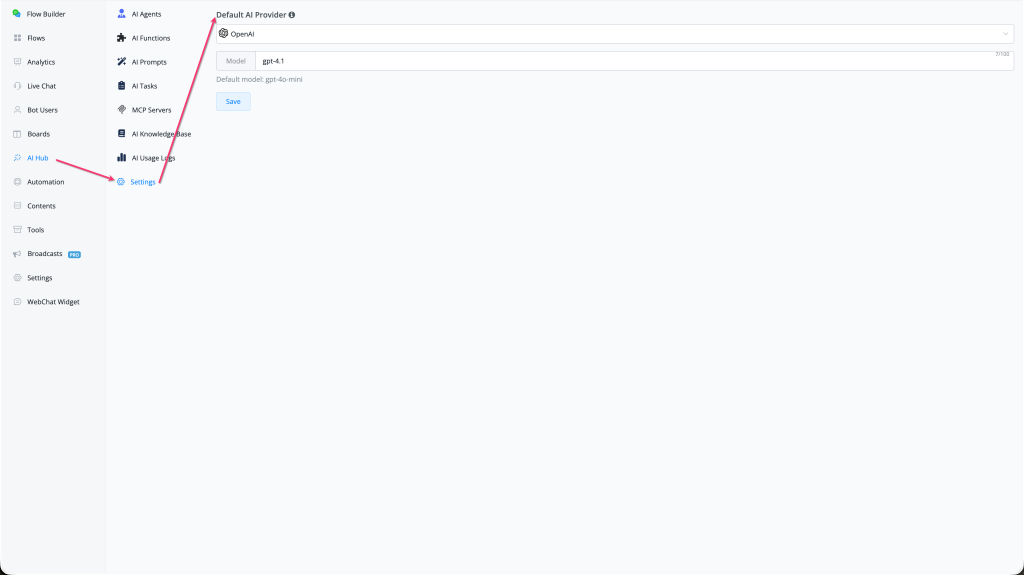
A new Default AI Provider setting is now available in AI Hub → Settings — allowing you to configure the global default AI provider and model used by AI Intent Recognition and AI Tasks across all flows in the workspace.
What's New
- 🤖 New setting: Default AI Provider — found at AI Hub → Settings (gear icon in the AI Hub submenu)
- 🔌 Select from any supported AI provider: OpenAI, Anthropic (Claude), xAI (Grok), Groq, and more
- 🧩 Set a specific Model within the chosen provider (e.g., gpt-4.1 for OpenAI)
- 📋 A Default model hint is shown below the model field (e.g., "Default model: gpt-4o-mini") to indicate the fallback when no model is specified
- 💾 Click Save to apply — takes effect immediately across all AI features that use the default provider
How to Use
- Go to AI Hub in the left sidebar
- Click Settings (gear icon, bottom of the AI Hub submenu)
- Under Default AI Provider, select your preferred provider from the dropdown (e.g., OpenAI)
- Enter a specific Model name if desired (e.g., gpt-4.1) — leave blank to use the provider default
- Click Save
Full documentation: AI Hub Settings
Where It's Used
The Default AI Provider setting is the fallback provider used when no specific provider has been configured at the individual feature level:
- AI Intent Recognition — uses the default provider when no override is set on the intent node
- AI Tasks — uses the default provider when no specific provider is set on the AI Task
- Additional AI features may inherit this default in future updates
Why It Matters
- Centralises AI provider configuration — set it once in AI Hub Settings and all AI features use it consistently
- Eliminates the need to configure a provider on every individual AI Intent node or AI Task
- Makes it easy to switch all AI features to a new provider or model in a single change
- Pairs with the Partner AI Key settings (OpenAI, xAI, Groq) for a fully managed AI stack across partner workspaces