Feature: add Integration - Google My Business - allow to list reviews, reply review by location
New Integration
Google My Business — List & Reply to Reviews by Location
UChat now integrates with Google My Business, allowing you to connect your Google account and manage business reviews directly from your workspace — including listing reviews and replying to them per business location, all within the Flow builder.
What's New
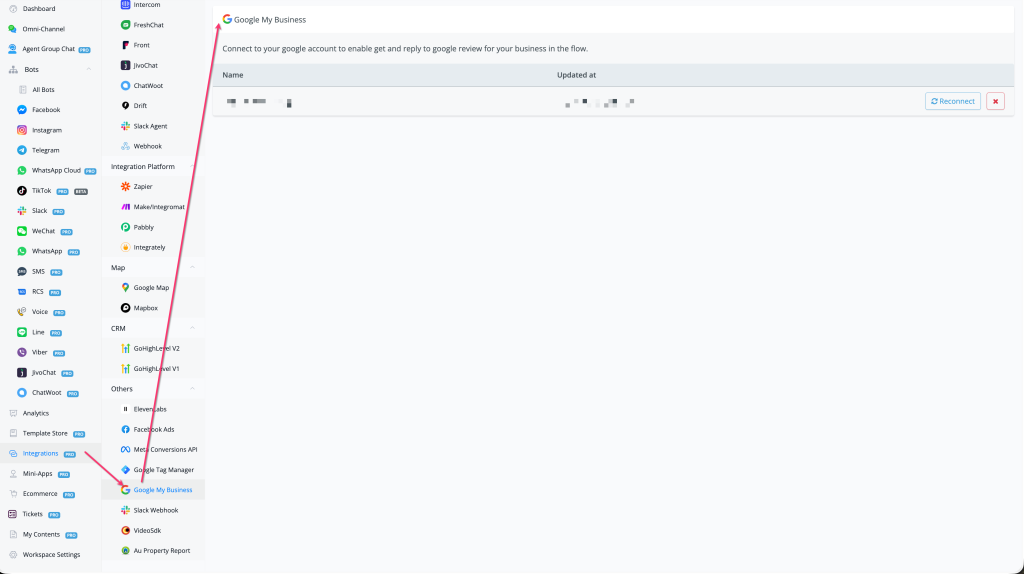
- 🏢 New integration: Google My Business — found under Integrations → Others → Google My Business
- 🔗 Connect your Google account via OAuth to link your GMB profile
- 📋 List reviews by location — retrieve Google reviews for any of your business locations
- 💬 Reply to reviews by location — send replies to customer reviews directly from a flow
- 🔄 Reconnect support — easily reauthorise your Google account if the connection expires
How to Use
- Go to Integrations in the left sidebar
- Scroll to the Others section and select Google My Business
- Click Connect and authorise with your Google account
- Your linked business location will appear in the integration panel
- In your Flow builder, use the Google My Business actions to List Reviews or Reply to a Review for a selected location
Use Cases
- Automatically monitor and respond to new Google reviews as part of a customer feedback flow
- Trigger follow-up messages or internal alerts when a review is received
- Build reputation management automations that reply to reviews based on star rating or keywords
Why It Matters
- Brings Google review management into UChat's automation ecosystem — no need to switch between platforms
- Especially valuable for local service businesses (e.g., ProfitsLocal clients) managing multiple Google Business locations
- Pairs naturally with Google Map integration already available in UChat
👉 Located at: Integrations → Others → Google My Business Published: November 19, 2025