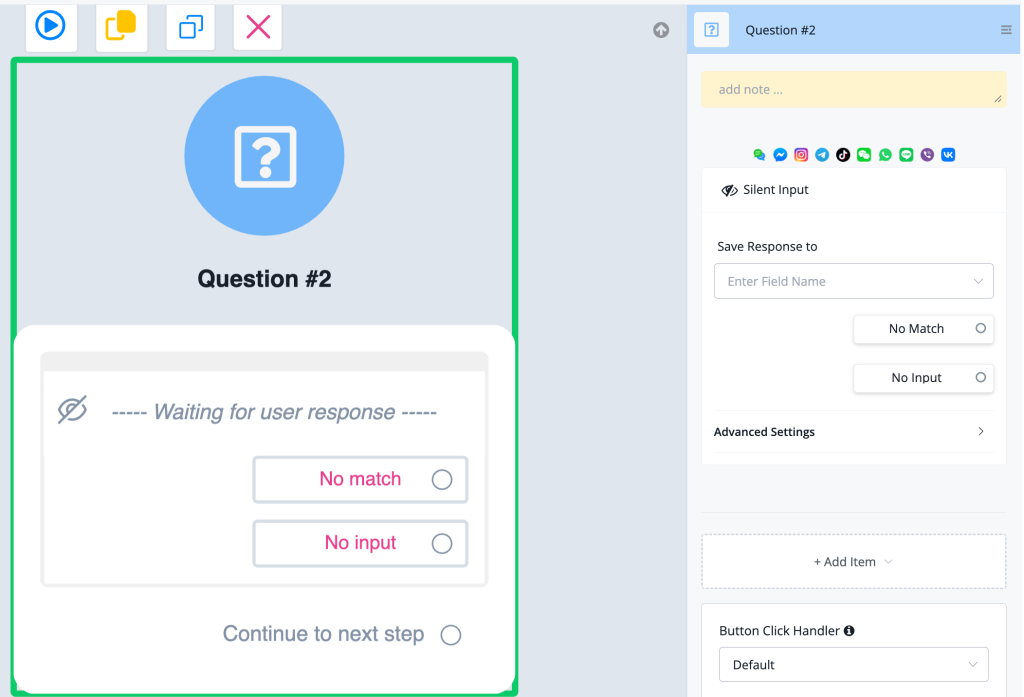
Feature: add new Question Item in Question node - Silent Input
Silent Input — New Question Item in the Question Node
The Question node now supports a Silent Input item type — allowing the bot to wait for a user response without displaying any visible message or prompt to the user.
What's New
- 🔇 New question item: Silent Input — adds a waiting step that listens for user input without sending any outgoing message
- 👁 Displayed with a hidden/eye-off icon (🚫👁) in the flow canvas to distinguish it from regular question items
- 💾 Supports Save Response to field — capture the silent input into any custom user field
- 🔀 Includes No Match and No Input exit paths — handle invalid responses or timeouts just like standard question items
- ⚙️ Compatible with Advanced Settings and Button Click Handler for full flow control
- 📱 Works across all supported channels (WeChat, Messenger, Instagram, Telegram, TikTok, WhatsApp, Line, Viber, VK, etc.)
How to Use
- Open or create a Flow in Flow Builder
- Add a Question node to your canvas
- Click + Add Item inside the Question node
- Select Silent Input from the item type list
- (Optional) Set a Save Response to field to capture whatever the user sends
- Connect the No Match, No Input, and Continue to next step exit paths as needed
Use Cases
- Capture a user's free-text reply after a previous message node without repeating a question
- Wait silently for an inbound message at a specific point in the flow (e.g., awaiting a payment confirmation or image upload)
- Build multi-step input flows where the prompt is delivered by a preceding Message node and the Question node only needs to capture the response
Why It Matters
- Separates the "display a message" concern from the "capture user input" conce