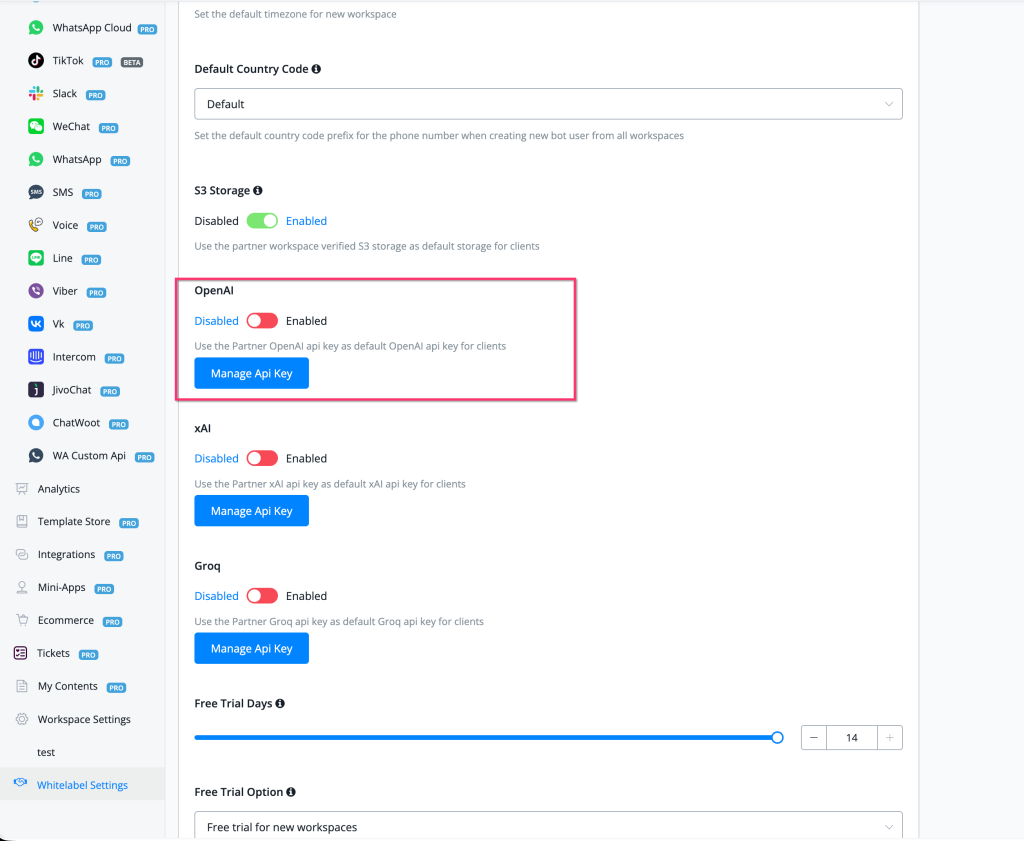
Feature: add Partner Setting - allow to use Partner OpenAI api key for clients as default OpenAI api key
## New Partner Feature
### Partner Setting — Use Partner OpenAI API Key as Default for Clients
Partners can now configure their own **OpenAI API key** in Whitelabel Settings and set it as the default OpenAI key used across all client workspaces — eliminating the need for each client to supply their own key.
#### What's New - 🔑 **New Partner Setting: OpenAI** — found under Whitelabel Settings alongside xAI and Groq partner key settings - 🔄 Toggle **Enabled/Disabled** to activate the partner key as the default for all client workspaces - 🛠 **Manage API Key** button — add, update, or rotate the Partner OpenAI API key at any time - 🤖 When enabled, all client workspaces use the partner's OpenAI key by default — clients don't need to configure their own - 📦 Part of a unified AI provider key management section in Whitelabel Settings covering **OpenAI**, **xAI**, and **Groq**
#### How to Use 1. Go to **Whitelabel Settings** in the left sidebar 2. Scroll to the **OpenAI** section (highlighted in the settings panel) 3. Toggle the switch to **Enabled** 4. Click **Manage API Key** to enter your OpenAI API key 5. All client workspaces will now use your partner OpenAI key as their default — no per-client key setup required
Full documentation: [Partner Setting — Global Open AI Integration](https://uchat.atlassian.net/wiki/spaces/UKB/pages/794427500/Partner+Setting#Global-Open-AI-Integration)
#### Related Partner AI Key Settings
| Provider | Setting | Description | |----------|---------|-------------| | **OpenAI** | Partner OpenAI *(new)* | Use partner OpenAI key as default for all clients | | **xAI** | Partner xAI | Use partner xAI key as default for all clients | | **Groq** | Partner Groq | Use partner Groq key as default for all clients |
#### Why It Matters - Partners can absorb AI API costs centrally and offer clients a seamless AI experience without setup friction - Ideal for whitelabel deployments where clients should not need to manage their own AI provider keys - Enables partners to control which AI providers are available to clients and standardise configurations across all workspaces
> 👉 Located at: **Whitelabel Settings → OpenAI → Manage API Key** > Published: **February 17, 2026**