Newest updates
.png)
This is only available for partners.
More about our partner program:
https://uchat.au/partner
https://docs.uchat.com.au/partner/about.html
More updates you can find here:
👉 https://feedback.uchat.com.au/updates
If you have any suggestion, you can submit here:
👉 https://feedback.uchat.com.au/boards/feature-requests
#UChatchangelog
#UChatupdates
.png)
This is an update about the Line channel.
Thanks to the suggestion from Winho!!
Before the update, we were using "push" to send all the message. Winho mentioned that this can cost their "push message" quota and suggested we can send message by using the replyToken, which means that, using "reply" instead of "push". This can save a lot consumption of "push message" to their Line account.
Now the system will use the replyToken to send the first message. For example, a user sends "hi". If you have 2 messages to respond to this greeting. The first one will be sent using "reply" and the second one (all the rest) using "push".
This can somehow save your "push" messages amount in your Line account.
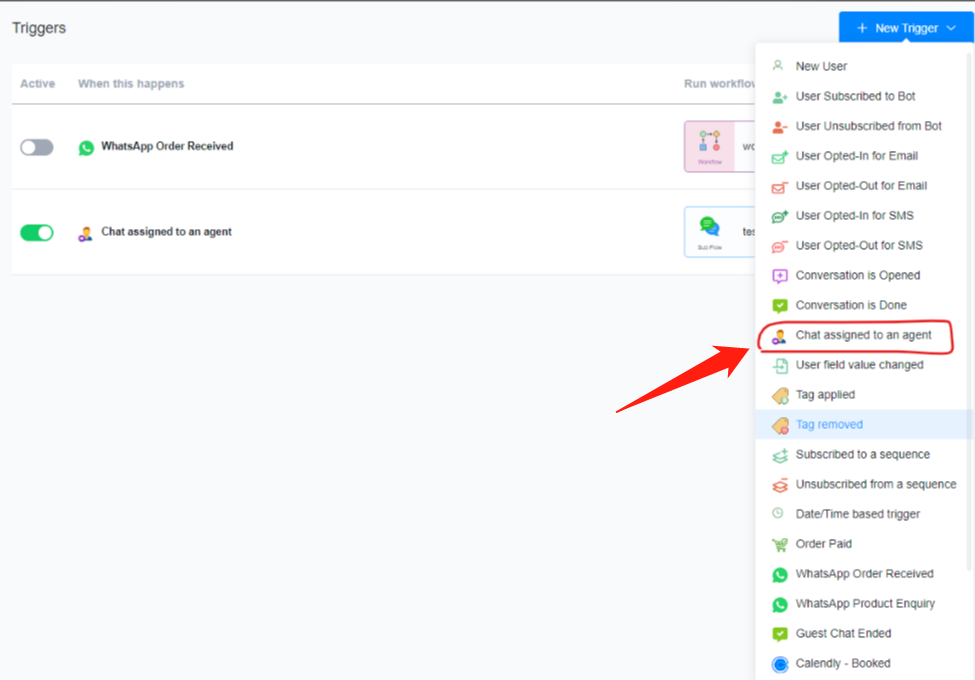
This is an update about triggers. We added a new trigger called "assigned to agent".
In any bot, go Automation > Triggers and you will find it here:
https://i.imgur.com/tCK5q9F.png
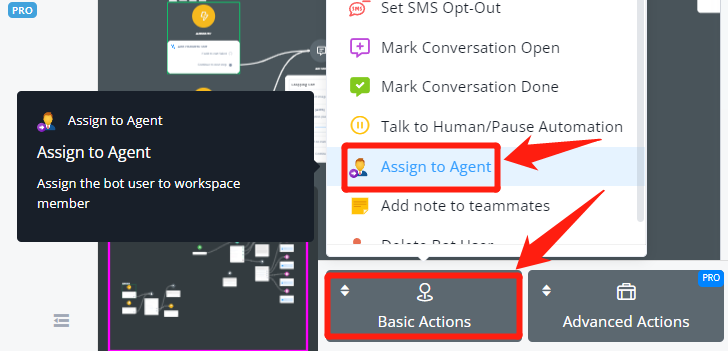
This can be used along with the "assign to agent" action. In Action Step > Basic Actions > Assign to Agent:
https://i.imgur.com/9VV8YZc.png
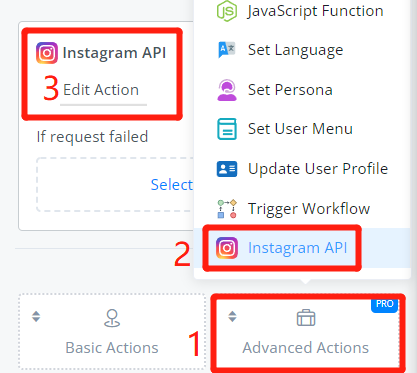
This is an update about the Action Step on Instagram Channel and Omni Channel.
Action Step > Advanced Actions > Instagram API:
https://i.imgur.com/uMrfWYi.png
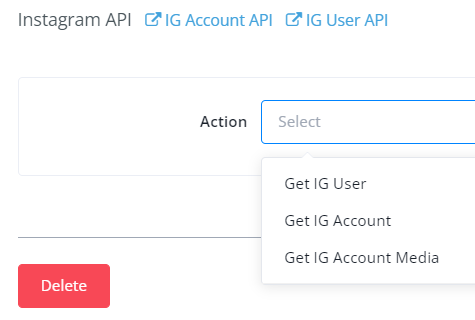
There are 3 actions available:
https://i.imgur.com/bQROrw3.png
1. Get IG User - get the Instagram profile of this bot user including info like "have the user followed you?" and their Instagram username, etc
2. Get IG Account - get the Instagram account info of the current chatbot including info like "how many followers does it have?".
3. Get IG Account Media - get media like video etc.
This is an update about Facebook comment growth tool.
You can now select your Dialogflow agent to process users' comments!

https://i.imgur.com/JjSxoCk.png
If the user's comment matches one of your fulfilment, the response will be used to reply to the user's comment on the post.
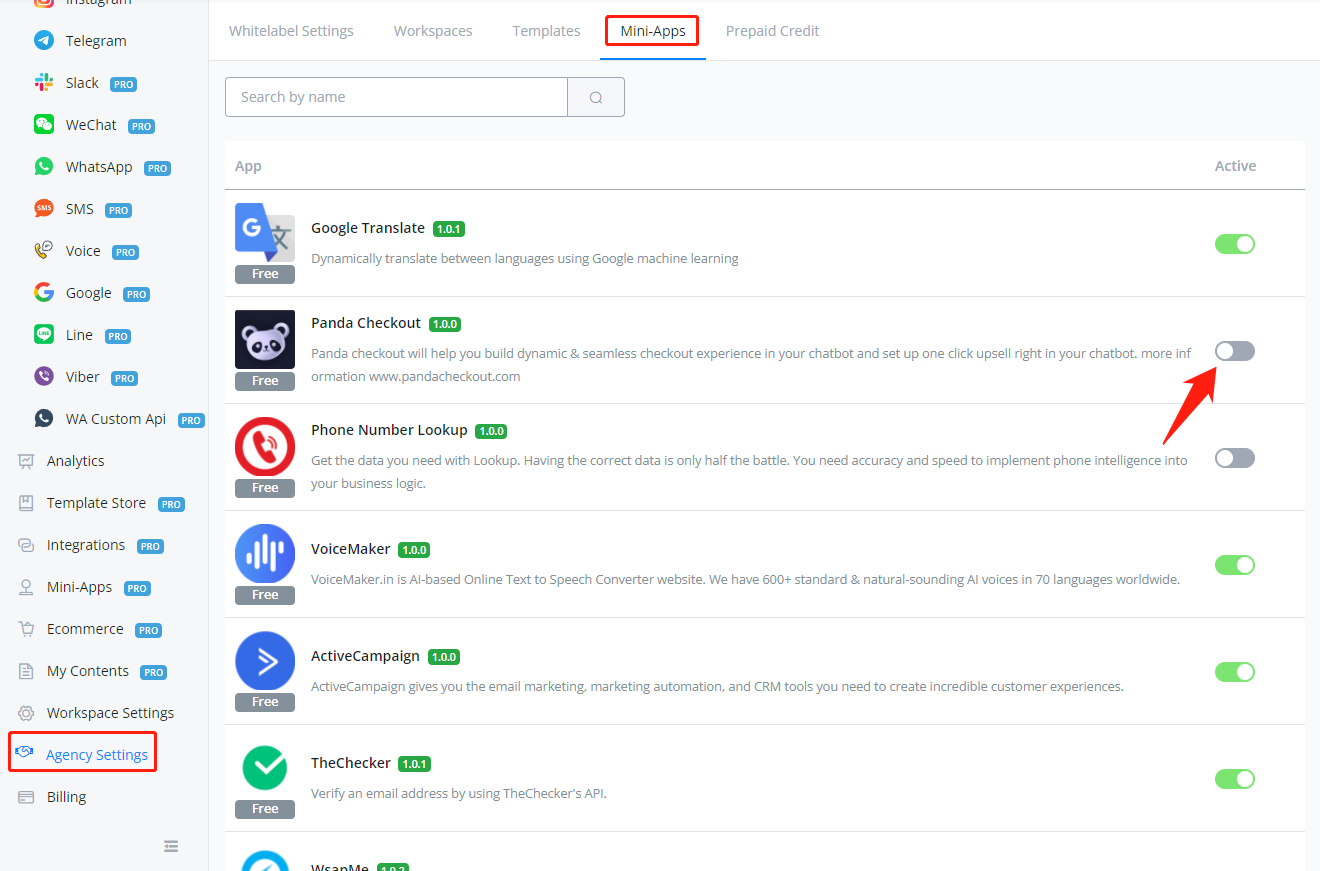
This is an update about Agency Settings for Partner Plan subscribers with credit billing enabled.
Before the update, all templates and mini-apps in the UChat template/app store will show in your custom domain for all your clients. Now you can choose to show or not show each one of the templates and apps.
To manage the settings, go "Agency Settings" on your dashboard, then "Templates" or "Mini-Apps":

https://i.imgur.com/oemEGrq.png
https://i.imgur.com/UrmqGwd.png
Older updates
.png)
Improved
Allow promotion code in stripe buy button
.png)
.png)
Delete workspace under Partner settings
This is only available for partners.
More about our partner program:
https://uchat.au/partner
https://docs.uchat.com.au/partner/about.html
More updates you can find here:
👉 https://feedback.uchat.com.au/updates
If you have any suggestion, you can submit here:
👉 https://feedback.uchat.com.au/boards/feature-requests
#UChatchangelog
#UChatupdates
Improved
Create workspace from partner API without email verification
.png)
Add fb comment through dialogflow
.png)
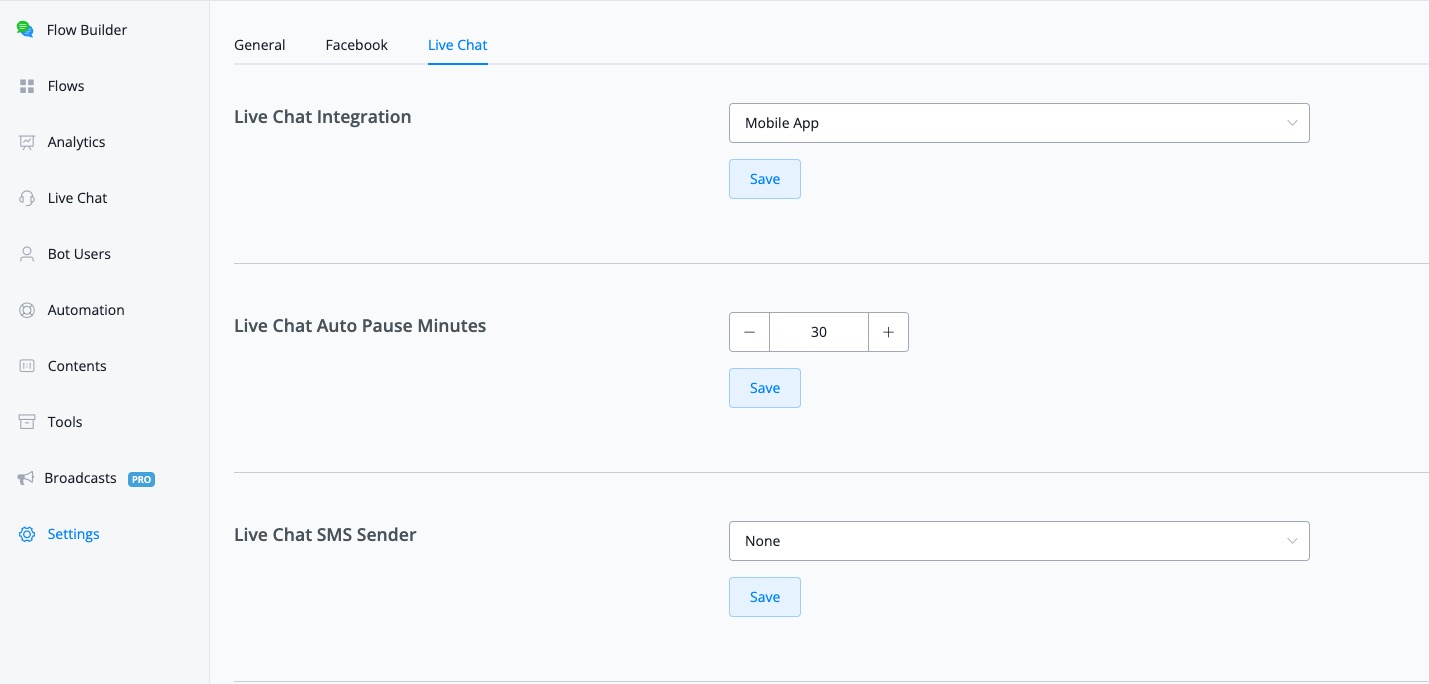
Add live chat auto pause time settings in the flow settings
.png)
Telegram to pull the profile picture if available
Telegram to pull the profile picture if available
.png)
.png)
Improved
Add min_score and fallback_to in dialogflow dynamic response json
.png)
Add stripe invoice payment trigger.
add stripe invoice payment succeeded and stripe invoice payment failed trigger for stripe buy button of subscription webhook
.png)
The sample data in the webhook payload:
The sample data in the webhook payload:
'id', 'object', 'account_country', 'account_name', 'amount_due', 'amount_paid', 'amount_remaining',
                        'attempt_count', 'attempted', 'created', 'currency', 'customer', 'customer_email', 'customer_name',
                        'hosted_invoice_url', 'invoice_pdf','livemode', 'number', 'payment_intent',
                        'period_end', 'period_start', 'status', 'subscription', 'tax', 'tax_percent',
                        'total', 'total_discount_amounts', 'total_excluding_tax', 'total_tax_amounts'
Improved
Line Channel: use replyToken for the first message sent
This is an update about the Line channel.
Thanks to the suggestion from Winho!!
Before the update, we were using "push" to send all the message. Winho mentioned that this can cost their "push message" quota and suggested we can send message by using the replyToken, which means that, using "reply" instead of "push". This can save a lot consumption of "push message" to their Line account.
Now the system will use the replyToken to send the first message. For example, a user sends "hi". If you have 2 messages to respond to this greeting. The first one will be sent using "reply" and the second one (all the rest) using "push".
This can somehow save your "push" messages amount in your Line account.
New
Triggers: assigned to agent trigger added
This is an update about triggers. We added a new trigger called "assigned to agent".
In any bot, go Automation > Triggers and you will find it here:
This can be used along with the "assign to agent" action. In Action Step > Basic Actions > Assign to Agent:
New
Instagram/Omni Channel - Action Step - Instagram API action added
This is an update about the Action Step on Instagram Channel and Omni Channel.
Action Step > Advanced Actions > Instagram API:
There are 3 actions available:
1. Get IG User - get the Instagram profile of this bot user including info like "have the user followed you?" and their Instagram username, etc
2. Get IG Account - get the Instagram account info of the current chatbot including info like "how many followers does it have?".
3. Get IG Account Media - get media like video etc.
Improved
Facebook Comment: Dialogflow agent supported.
This is an update about Facebook comment growth tool.
You can now select your Dialogflow agent to process users' comments!
If the user's comment matches one of your fulfilment, the response will be used to reply to the user's comment on the post.
New
Facebook Comment - Hide user comment
This is an update about Facebook channel - comment growth tool.
You can now select "Hide the user comment" when setting a comment in your Facebook bot:

https://i.imgur.com/vYerurE.png
This means that, when keyword matched, your bot can automatically hide this comment in your post.
You can now select "Hide the user comment" when setting a comment in your Facebook bot:
This means that, when keyword matched, your bot can automatically hide this comment in your post.
Improved
Partner Plan: show only selected templates & mini-apps in custom domain
This is an update about Agency Settings for Partner Plan subscribers with credit billing enabled.
Before the update, all templates and mini-apps in the UChat template/app store will show in your custom domain for all your clients. Now you can choose to show or not show each one of the templates and apps.
To manage the settings, go "Agency Settings" on your dashboard, then "Templates" or "Mini-Apps":
 Powered by FeedBear